Building a Personal Red Teaming Knowledge Base on GitHub
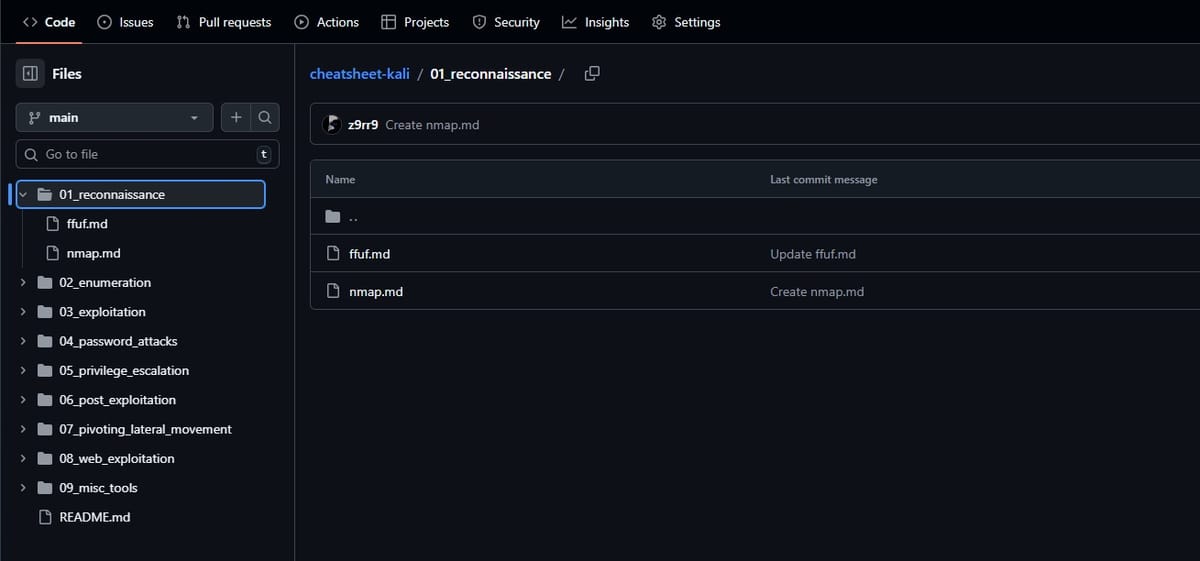
Alongside my main responsibilities, especially exam preparation and other ongoing commitments, I am currently working on a small side project that has turned out to be far more useful than I initially expected. The core idea behind this project is to build and maintain a set of GitHub repositories that act as a centralized knowledge base for red teaming and penetration testing. These repositories contain my scripts, notes, and, most importantly, practical command references for the tools I regularly use.
The motivation for this project came from a very familiar problem. In day-to-day security work, labs, and training environments, a surprising amount of time is lost on small but repetitive tasks. Even when using the same tools over and over again, it is unrealistic to remember every command-line flag, syntax detail, or useful variation. Tools like nmap, gobuster, ffuf, hydra, or various post-exploitation utilities are powerful, but they come with a wide range of options that are easy to forget when they are not used daily.
As a result, I found myself repeatedly interrupting my workflow to search for documentation, blog posts, or cheat sheets. Individually, these interruptions seem minor, but over time they add up and significantly break focus. This side project exists to eliminate exactly that kind of friction.
Instead of constantly googling command syntax, my goal is to have everything I actually use in one central, version-controlled place. Over time, this project has shifted away from writing custom scripts and toward building a structured, practical reference that is always available. The emphasis is not on theoretical explanations or exhaustive documentation, but on ready-to-use command templates that work in real scenarios. In most cases, using these templates simply means replacing placeholders such as IP addresses, domain names, usernames, or file paths and then executing the command.
The repositories are structured in a way that mirrors how I approach red teaming engagements in practice. Rather than organizing content by tool popularity or alphabetical order, everything is grouped according to typical phases of an attack lifecycle. This makes it easier to quickly find what is relevant in a given situation. When working on reconnaissance or enumeration, for example, I want to immediately see the tools and commands that make sense in that phase without having to think about where they might be documented.
An important aspect of this project is that I deliberately limit its scope. Kali Linux includes a vast number of tools, many of which are interesting but rarely used in real workflows. Documenting everything would quickly turn the repository into noise. Instead, I focus exclusively on the tools I actively use. This keeps the content compact, readable, and genuinely helpful. Each documented tool usually includes a short description, one or more command templates, commonly used flags or extensions, and variations for different scenarios. Everything is kept minimal and easy to adapt.
GitHub is a natural choice as the platform for this project. Accessibility is one of the biggest advantages. Since the repositories are available online, I can access them from virtually anywhere. Whether I am working on a lab machine, a virtual environment, or a different workstation entirely, I always have the same reference available. This consistency alone makes a noticeable difference.
Version control is another major benefit. Tools evolve, syntax changes, and workflows improve over time. Using GitHub allows me to update entries incrementally and track how my approach develops. It also introduces a certain level of structure and discipline. Writing commands down in a clean and reusable way forces clarity. If a command or workflow is unclear, it becomes obvious very quickly when trying to document it properly.
From a practical perspective, this personal knowledge base already provides tangible benefits. It significantly reduces context switching, since less time is spent searching for information and more time is spent testing and analyzing. Reusing known, working command templates also improves consistency and reduces mistakes, especially under time pressure. Setting up tools during labs or exercises becomes faster, and the act of documenting commands reinforces learning rather than replacing it.
At the moment, this project is clearly a side project. Due to exams and other obligations, progress is steady but not fast. New tools and entries are added whenever time allows, without any pressure to reach a certain level of completeness. The current focus is on covering the tools included in Kali Linux that I genuinely use on a regular basis. Once this baseline is solid, the repository can evolve further based on real-world usage and changing requirements.
There is no intention to make this perfect or exhaustive. The value of the project comes from usefulness, not completeness. Over time, it naturally becomes more than just a cheat sheet. It turns into a reflection of how I work, which tools I trust, and how I approach technical problems during red teaming tasks.
In the long term, this knowledge base will continue to evolve alongside my technical growth. As workflows change and new tools become relevant, the repositories will adapt accordingly. Maintaining a centralized, personal reference for red teaming tools is a relatively small investment, but it offers a surprisingly large return. It saves time, reduces friction, and supports a more focused and efficient way of working. Even as a side project, it has already proven to be a valuable addition to my daily workflow.